Running head: Network Design
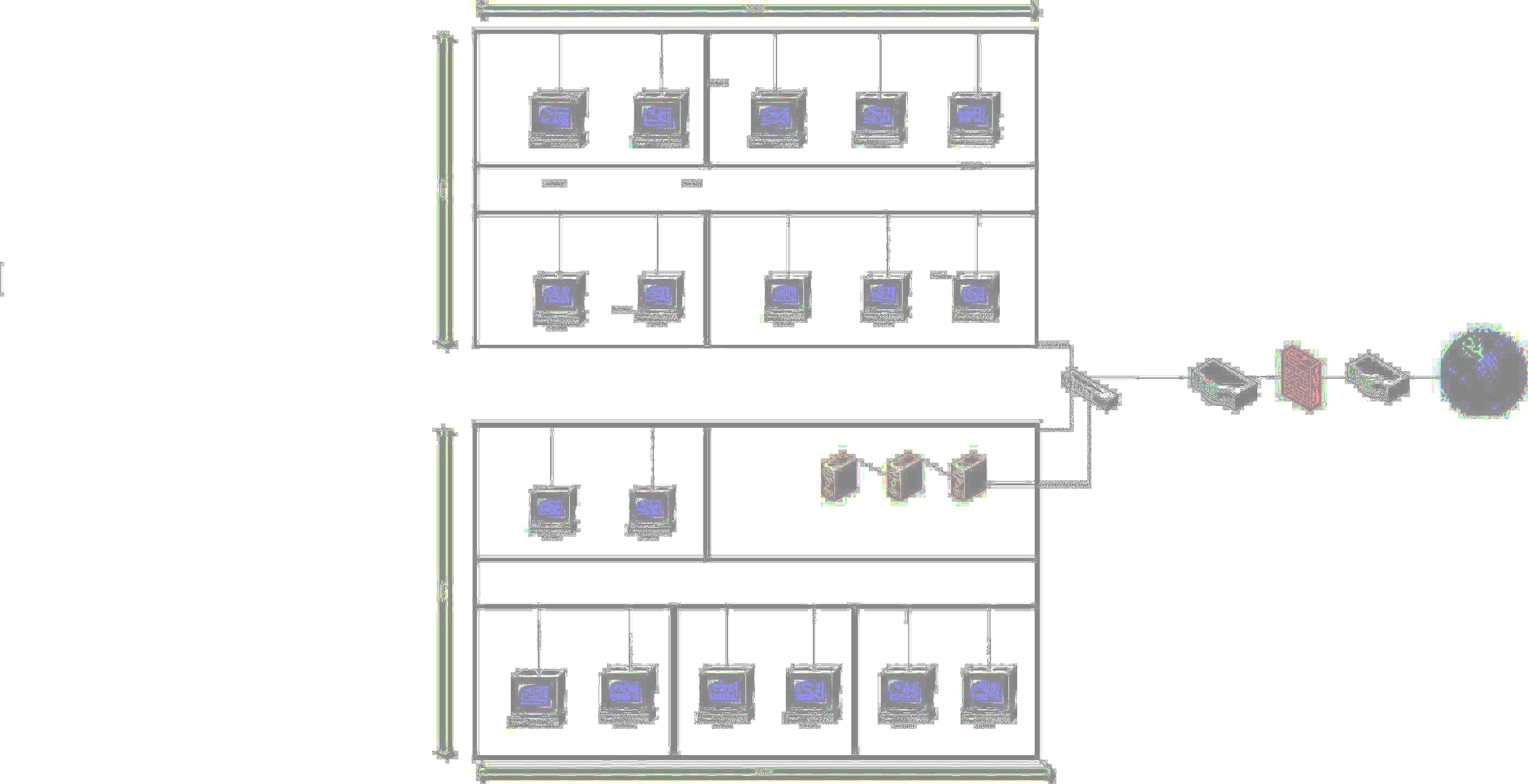
Network Design for a Two Stored Building
Rakesh Kalidindi
Ferris State University
MISM 670
The basic elements used for designing a network are
- Workstations
- Servers
- Hubs
- Switch
- Route
- Firewall
- Ethernet Cable
Workstation
A workstation is a microcomputer designed for technical or scientific applications. It is a client side system that initiates request.
Servers
A server is a high- end computer dedicated to provide one or more services over a computer network, through a request-response routine. It can handle multiple requests at a time.
Hubs
A hub is a device that connects multiple systems to form a single network segment.
Switch
A switch is a networking device that connects multiple network segments. Switches appear nearly identical to hubs, but a switch contains more intelligence and smarter than a hub. Switches are capable of inspecting data packets as they are received, determining the source and destination device of that packet, and forwarding it appropriately to the destination.
Router
Router is a device that connects different networks.
Firewall
Form of internet security that stands between a private network and external network to prevent unauthorized access to and from private network.
Ethernet Cable
An Ethernet cable is a cable that connects network elements like computers, hubs and switches. Different type of cables is used based on the speed and size of the network. There are 3 different types of cables which are commonly used
Ø Twisted Pair
Ø Coaxial
Ø Optical Fiber
PRODUCTS AND ITS COST
Workstation – Optiplex 330
I have selected dell Optiplex 330 workstations to my company as they are robust and is great for Companies looking for essential productivity and easy manageability across a network.
Specifications
- “ Intel® Core™ 2 Duo Processor E4600 (2.4GHz, 2M, 800MHz FSB), Genuine Windows Vista Business Bonus-Windows XP Professional downgrade
- Intel® Core™ 2 Duo Processor E4600 (2.4GHz, 2M, 800MHz FSB)
- Genuine Windows Vista Business Bonus-Windows XP Professional downgrade
- 2GB DDR2 Non-ECC SDRAM,667 MHz, (2 DIMM)
- 160GB SATA 3.0 gb/s and 8MB Data Burst Cache™
- 16X DVD+/-RW SATA, Roxio Creator™ CyberlinkPowerDVD™
- Integrated Video, Intel® GMA3100
- Dell 19 inch E198WFP Widescreen Flat Panel, Analog
- NTFS File System for all Operating Systems”. www.dell.com
COST - $ 659
Server - PowerEdge M600 2- Socket, Intel Quad-Core Half Height Blade Server
I have server this server as it provides high density computing, features the latest high performance technologies. ‘It is great for front end SAN or ISCSI workloads, Database applications, Virtualized/Consolidated workloads, High Performance Compute Clusters, Network Infrastructure, Web Applications.” www.dell.com
Specifications
Processor
Quad-Core Intel® Xeon®
Dual-Core Intel® Xeon®
Memory
Up to 64GB2 FBD-667MHz SDRAM
Maximum Internal Storage
Up to 300GB3
Maximum Internal Storage
Memory
COST - $1249
Switch - Power Connect 3524
This switch provides robust security, resilient stacking, and enterprise-class management features which are ideal for edge of network applications requiring speed, availability and management.
Specifications
- “24 10/100BASE-T auto-sensing Fast Ethernet switching ports
- Additional 2 Copper GbE ports PLUS 2 optional Fiber GbE via SFP transceivers
- Integrated Copper GbE ports provide resilient stacking
- Auto-negotiation for speed, duplex mode and flow control
Port mirroring
- Broadcast storm control
- 24 Ports, Managed Switch, Stacking Capable.” www.dell.com
Cable - Belkin A3L791-S 50-Foot RJ45 CAT 5e Snagless Molded Patch Cable
“Belkin's A3L791-S RJ-45 CAT-5e patch cable delivers the durability, quality, and at 50 feet the length required of a connection linking all the hardware destinations in a Local Area Network (LAN”). www.amazon.com
Router - D-Link Ethernet Broadband Router EBR-2310
“This Router provides four 10/100 Ethernet ports to connect up to four Ethernet-enabled PCs or network devices. Switching capabilities have been integrated into this device to efficiently manage your network traffic. This Wired Router includes a built-in firewall for safeguarding your network from hackers and malicious attacks. Parental control features are also included to monitor Internet usage and block inappropriate content.”
Specifications
· “WAN Port(s): 1
· 10/100 Mbps Ports: 4
· Routing / Firewall Protocols: PPPoE, DHCP,HTTP
· Firewall Features: MAC Filtering, IP Filtering, URL Filtering, Scheduling.” www.dlink.com
COST - $ 47.99
Firewall - NETGEAR's ProSafe VPN/Firewall 8
“This firewall provides business class protection. “Stateful Packet Inspection (SPI) stops major Denial of Service (DoS) attacks. Intrusion Detection alerts you to hackers and attacks. Up to 8 simultaneous Virtual Private Network (VPN) connections protect links between business locations, encrypting all traffic as it traverses the Internet - perfect for telecommuters and remote offices. With 4 10/100 Mbps auto-sensing, Auto Uplink switched LAN ports and Network Address Translation (NAT) routing, up to 253 users can access your broadband connection at the same time.” www.netgear.com
Cost - $52
Wiring Charges $300
TOTAL COST ESTIMATION
|
Network Devices |
Cost |
|
Quantity |
|
Total Cost | |
|
Work Stations |
|
$659 |
|
18 |
|
11862 |
|
|
|
|
|
|
|
|
|
Servers |
|
$1,249 |
|
3 |
|
3747 |
|
|
|
|
|
|
a#sys_yolacredit_a1:hover {text-decoration: underline!important; font-weight:normal!important}
a#sys_yolacredit_a2:hover {text-decoration: underline!important; font-weight:normal!important}
a#sys_yolacredit_a1 {text-decoration: none!important; font-weight:normal!important}
a#sys_yolacredit_a2 {text-decoration: none!important; font-weight:normal!important}
#sys_yolacredit_left {background:url(classes/commons/yola_footer/png/yolaTag.png) top left no-repeat;}
#sys_yolacredit_center {background:url(classes/commons/yola_footer/png/yolaTag.png) -10px top no-repeat;}
#sys_yolacredit_right {background:url(classes/commons/yola_footer/png/yolaTag.png) top right no-repeat;}
| |
